Volume Indicator V3
Comprehensive Volume Analysis with Multi-Signal Detection
Overview
The Volume Indicator V3 is a comprehensive and highly customizable volume analysis toolkit designed to alert traders to significant market activity. Instead of providing a single, one-size-fits-all signal, this indicator monitors for four distinct types of volume events, each representing a different aspect of institutional interest, momentum, or market exhaustion. This allows traders to build a nuanced understanding of the forces driving price action.
The indicator can be configured to monitor the volume on the current chart's symbol or, uniquely, to pull volume data from a different, user-selected symbol. This allows for sophisticated inter-market analysis, such as monitoring the volume of an index (like SPY) while trading a related stock.
Each of the four signal types is independent, with its own dedicated logic and alert conditions. They can be enabled or disabled individually, allowing traders to focus only on the volume signatures that are most relevant to their strategy.
Methodology & Logic
The indicator is built around four independent detection modules. Each module analyzes the selected symbol's volume stream to identify a specific condition and, if found, plots a colored circle on the chart and triggers an alert.
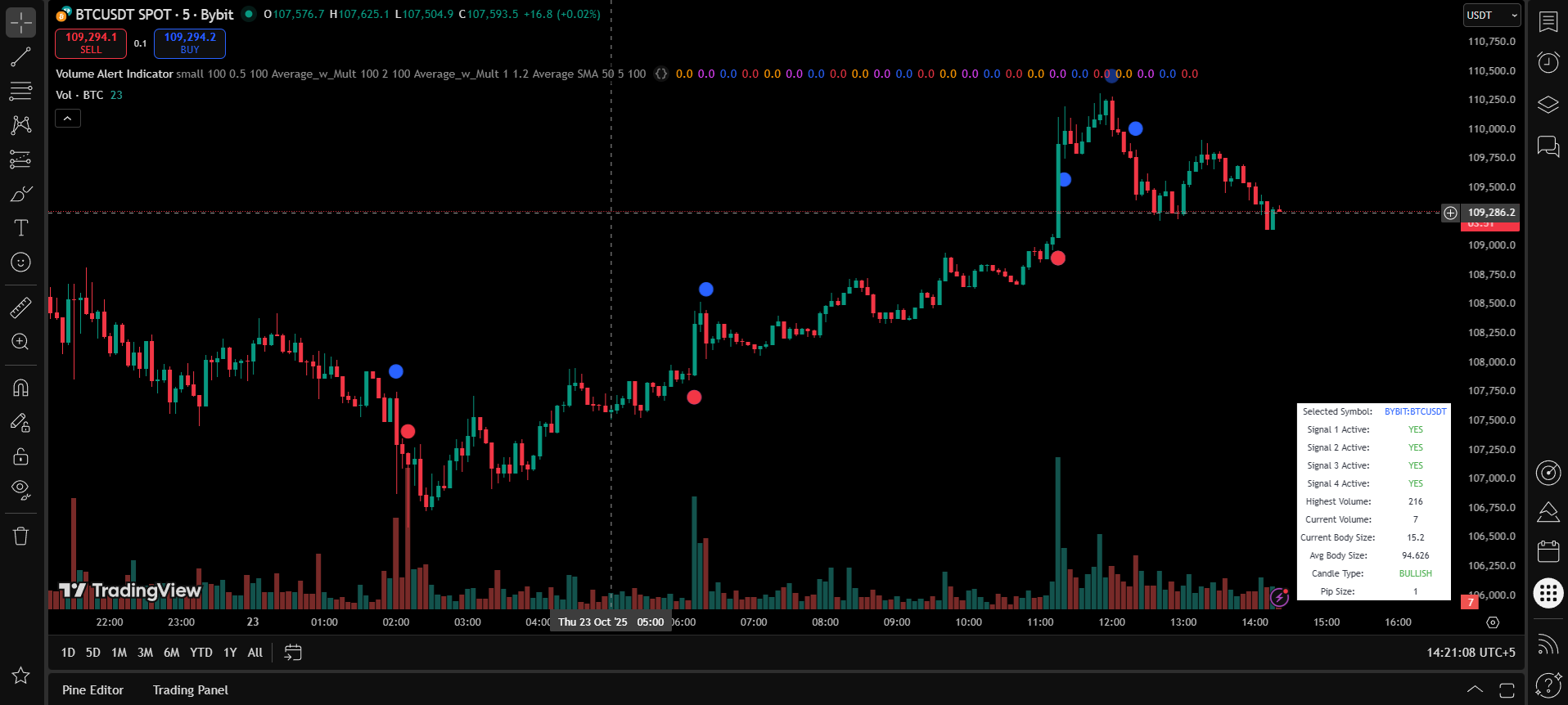
Signal 1: New Highest Volume (Orange Circle)
This is the simplest yet most powerful signal. It identifies when the volume of the current bar is the absolute highest within a user-defined lookback period. Such events often mark climactic tops/bottoms, the start of a major trend, or significant news-driven moves.
Signal 2: Follow-Up Volume (Fuchsia Circle)
This signal looks for confirmation after a "New Highest Volume" event. It triggers on the very next bar if its volume is greater than a specified percentage of the preceding peak volume. High follow-up volume confirms continued institutional interest and suggests the move initiated by the peak volume bar has strength and is likely to continue.
Signal 3: High Volume with Large Candle (Blue Circle)
This signal seeks confluence between volume and price momentum. It triggers only when two conditions are met simultaneously:
- Volume Condition: The current bar's volume must exceed a threshold (e.g., a multiple of the average volume, the highest volume in a lookback, or an absolute value).
- Candle Size Condition: The body size (open-to-close) of the current candle must also exceed its own threshold (e.g., a multiple of the average body size or an absolute pip/point value).
This combination signals strong, committed momentum in a single direction.
Signal 4: Unusual Volume Spike (Red Circle)
This signal is designed to catch extreme, anomalous volume events. It triggers when the current volume exceeds a high threshold, typically a large multiple of the average volume (e.g., 5x or more) or a very high absolute value. These spikes often correspond to major news events, market open/close volatility, or potential exhaustion points ("blow-off tops/bottoms").
Parameters & Settings
Each of the four signals is fully customizable via the indicator settings.
| Parameter Group | Key Inputs | Description |
|---|---|---|
Pair Selection |
Select Symbol for Volume Analysis |
The core input for inter-market analysis. Leave blank to use the current chart's symbol, or enter another symbol (e.g., "SPY") to analyze its volume. |
Activation Switches |
Enable... (for all 4 signals) |
Four separate checkboxes to turn each of the four signal types ON or OFF. |
Signal 1: New Highest Volume |
Highest Volume Lookback Period |
Sets the number of past bars to compare against to find a new highest volume. |
Signal 2: Follow-Up Volume |
Next Bar Volume Threshold (%) |
Sets the minimum volume required for the follow-up bar, as a percentage of the preceding peak volume bar. |
Signal 3: High Volume + Large Candle |
Volume Check... & Candle Size... inputs |
Provides granular control over both the volume and candle size thresholds, including using average multipliers or absolute values. |
Signal 4: Unusual Volume Spike |
Unusual Spike... inputs |
Defines what constitutes an "unusual" spike, either as a multiple of the average volume or a fixed absolute threshold. |
Technical Specifications
Visual Documentation
The indicator uses a simple, color-coded system of circles to denote different volume events.
Usage Guide
This indicator provides actionable context by revealing the conviction behind price moves.
Strategic Applications
- Confirmation Tool: Use the volume signals to confirm other technical patterns. A breakout from a consolidation range is much more reliable if accompanied by a Blue Circle (High Volume + Large Candle).
- Reversal Spotting: An Orange Circle (New Highest Volume), especially after a long trend, can often signal a climax or exhaustion point, warning of a potential reversal. This is particularly potent if the candle has a large wick.
- Trend Strength: A series of Fuchsia Circles (Follow-Up Volume) during a trend indicates strong, sustained participation and suggests the trend is healthy and likely to continue. The absence of follow-up volume after a breakout can be a warning sign.
- News & Anomaly Detection: A Red Circle (Unusual Spike) is a clear signal to be cautious. It indicates that volume is far outside the recent norm, often due to a major news release or event. It's a sign to assess the context before taking a trade.
- Inter-Market Context: Set the
Select Symbolto a market index (like SPY for stocks or DXY for forex) to gauge overall market sentiment. A volume spike on the index can give you a heads-up about potential moves in correlated assets.
Best Practice Guidelines
- Combine volume signals with price action analysis for higher probability setups
- Use the cross-symbol feature to understand broader market context
- Pay special attention to follow-up volume after breakouts or reversals
- Consider the timeframe - higher timeframe signals carry more weight
- Always validate with other technical indicators before taking positions
Alert Configuration
The indicator is designed for seamless alerting. Each of the four signal types has its own independent alertcondition.
Setting Up Alerts
- Go to TradingView's "Alert" panel
- Set the "Condition" to the "Volume Alert Indicator"
- You will see a dropdown menu with four distinct alert options:
- New Highest Volume Alert: Triggers on an Orange Circle
- Volume Follow-Up Alert: Triggers on a Fuchsia Circle
- High Volume with Large Candle Size Alert: Triggers on a Blue Circle
- Unusual Volume Spike Alert: Triggers on a Red Circle
- Select the desired alert condition, choose your trigger settings (e.g., "Once Per Bar Close"), and create the alert
Pro Tip: You can create separate alerts for each of the four conditions to receive different notifications based on the type of volume activity detected.
Risk Disclaimer
Trading involves substantial risk. This indicator is a technical analysis tool and does not guarantee profitable trades. Past performance does not indicate future results. Users should conduct their own analysis and risk assessment before making any trading decisions. Never risk more than you can afford to lose.